

A form by any other name would fill out just as sweet...
Images, you b*tch
Hello world, again,
This week the challenge was all about adding images to pages and showcasing the brilliantly, gorgeous gatsby-image API. To summarise the objectives for those unfamiliar, the tasks this week were to:
- add an image to markdown-based blog post
- create an about page
- learn about gatsby-image api to transform selfie into a black and white square
- implement above on the about page
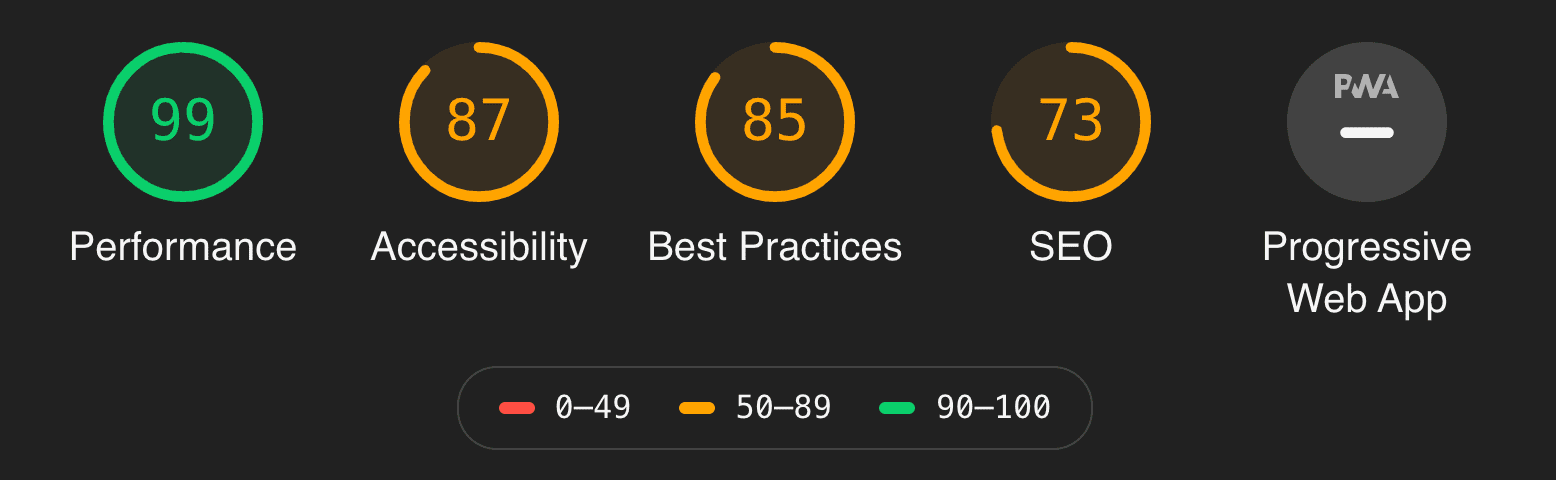
- do lighthouse audit before and after adding image (extra)
More details can be seen at the gatsby 100 day challenge.
But boy, oh boy, was adding an image more difficult than I thought it would be. I'm sure the <img> could've sufficed but no... To fully utilise Gatsby's image optimization through the gatsby-image api one has to work for it.
And work for it I did.
Adding an image to Markdown
Firstly, a quick read through of Gatsby's working with images in markdown post provided an outline of steps to incorprate images in my blog:
- Add the images to src/images folder
- Add the folder to gatsby-config.js
- Add image's relative url/path to frontmatter
Following said steps, only frustratingly resulted in an error message:
Field "image" must not have a selection since type "String" has no subfields
What does this even mean? After some light googling came the sensation of derp when I discovered that someone else had made the same error: the url/source dir was incorrect. After that was realised, another error appeared. Cool.
Turns out blog posts with no images were unaccounted for and thus errored out. There was an error in my logic--fair call! I edited blog-post.js to ignore the function of image adding should a url not be present in its frontmatter... and lo-and-behold 'twas fixed and I accomplished my first real task!
*Pats self on back*
Adding an image to JSX
Reading about the API proved harder than I had planned. This may be due to my irregular sleep cycle or the fact I haven't left the house in a few days (thanks pandemic) but I felt less focused as of late, and lack of focus is not conducive to productivity, let alone reading documentation. But I digress.
So, to add an image to my JSX about page I read up on another Gatsby doc. To summarise, the steps I made to achieve this were:
- Script up the GraphQL query
- Add ({ data }) to the function to utilise the data returned from query
- Add import Img from 'gatsby-image'
- Add <Img> to JSX
It was pretty straight forward. And bam! – 3 of the tasks completed.
✅ ✅ ✅
Lighthouse this
Finally, the lighthouse audit.
Before:
After:
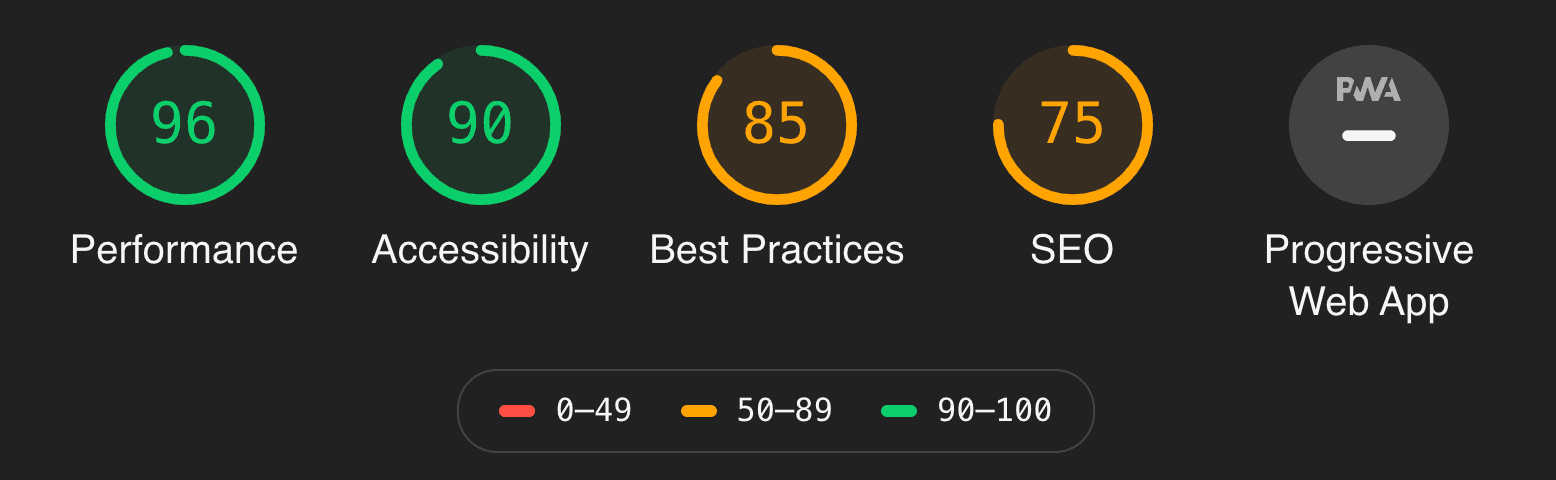
Pretty darn good I must say. Image optimisation at its finest! There was only a three percent drop in performance but that's not too bad!
Conclusion
I'd say this has been the most eventful week of my Gatsby challenge. I still need to clean up my code and have still yet to implement a reuseable component for the top nav bar (added to my todos). However, the week has been successful in terms of meeting the objectives and my productivity.
Featuring images on your blog can initially be a pain in the ass, but just like riding a bike once you know you know–until something changes in the code base. Also, it does add a bit of flare to your site and makes it less boring, I suppose.
Resources
Main docs:
https://www.gatsbyjs.org/docs/working-with-images/
https://www.gatsbyjs.org/docs/working-with-images-in-markdown/
https://www.gatsbyjs.org/docs/images-and-files/
https://www.gatsbyjs.org/docs/gatsby-image/
https://www.gatsbyjs.org/packages/gatsby-image/
Supporting docs:
https://www.gatsbyjs.org/docs/plugins/
https://www.gatsbyjs.org/packages/gatsby-source-filesystem/
https://www.gatsbyjs.org/docs/gatsby-config/
https://www.gatsbyjs.org/docs/gatsby-link/
Comments
Add comment